Krea2 Turbo 在 2080 Ti 上部署全记录:六层踩坑与修复
本文最后更新于 2026年7月10日 下午
前言:为什么要折腾 Krea2
Krea2 是 Krea.ai 发布的 12B 参数 DiT 模型,基于 flow-matching 架构,支持 1K 到 2K 分辨率。在图像质量上,它直接对标 Midjourney 和 DALL·E 3 级别的商用模型。更关键的是,它是开源的。
但开源不意味着开箱即用。在双 RTX 2080 Ti(22GB 魔改版)上部署 Krea2 Turbo,我遇到了整整六层问题,每一层都是独立的坑,少了任何一个都出不了正常图。
这篇文章记录完整调试链,希望能帮到同样在旧卡上折腾 Krea2 的人。
环境配置
| 组件 | 规格 |
|---|---|
| 显卡 | 双 RTX 2080 Ti(22GB 魔改版),GPU1 跑 ComfyUI |
| 推理 | ComfyUI v0.27.1(源码部署) |
| 显存 | 22GB,可支撑 Q4_0 GGUF(7.8GB)+ BF16 CLIP(8.3GB) |
| 模型 | Krea2 Turbo 12B DiT,GGUF 量化版 |
| 超分 | 4x-UltraSharp(人脸清晰) |
| 代理 | 代理服务器(下载用) |
最终工作流配置
经过六层调试,最终在 2080 Ti 上跑通的配置如下:
1 | |
关键参数说明
- DiT 模型:krea2_turbo_bf16-Q4_0.gguf(7.8GB,Q4_0 GGUF 量化,int8 原生路径)
- CLIP 模型:qwen3vl_4b_bf16.safetensors(8.3GB,BF16 版,float16 原生路径)
- CLIP 加载器:必须用原生 CLIPLoader(非 CLIPLoaderGGUF),type=”krea2”
- VAE:qwen_image_vae.safetensors(官方指定,ComfyUI 自动识别为 WanVAE)
- Latent:EmptyHunyuanLatentVideo(5D,Wan21 格式)
- CFG:1.0(不是 0.0!ComfyUI 公式中 cfg=1.0 才对应官方 –cfg 0.0 的语义)
- Steps:8(Turbo 模式)
- 启动参数:–fp32-unet –fp32-vae(Turing 架构无原生 bf16,fp16 溢出 NaN)
可选配置对比
| 场景 | 模型 | 尺寸 | 耗时 |
|---|---|---|---|
| 快速预览 | Q4_0 | 512×512 | ~47s |
| 日常出图 | Q4_0 | 768×512 | ~61s |
| 超分输出 | Q4_0 + 4x-UltraSharp | 1536×1024 | ~61s |
| 最高质量 | Q5_1 | 1024×1024 | ~150s |
4x-UltraSharp 超分下载
4x-UltraSharp 是推荐的人脸超分模型,64MB,下载自 HuggingFace:
1 | |
出图效果验证
修复后的效果对比(同一 prompt、同一 seed):
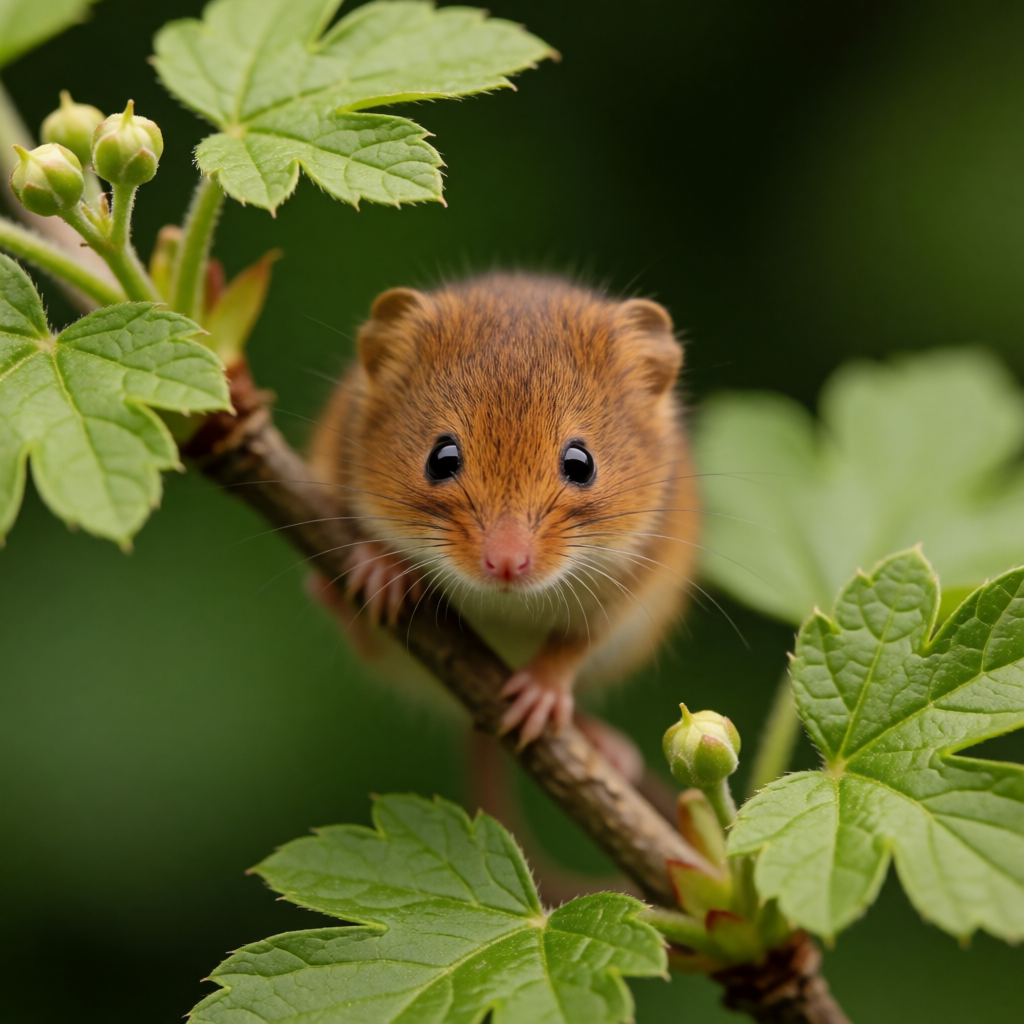
案例一:田鼠微距
Prompt:A tiny russet-brown harvest mouse clings to a slender branch, macro photography, shallow depth of field, green bokeh background
修复前(FP8 CLIP + cfg=0.0)→ 出动漫少女侧脸,prompt 遵循度 0/10
修复后(BF16 CLIP + cfg=1.0)→ 棕色皮毛、粉红鼻子、大眼、细小爪子、绿叶 bokeh,10/10
案例二:东亚女性肖像
Prompt:A close-up portrait of a young East Asian woman with straight black hair, wearing a crisp white shirt and navy blue tie, surrounded by white lilies against a rich red background
修复后 → 10/10 遵循度,画质 9/10。衬衫、领带、百合花、红色背景全部正确呈现。

案例三:敞篷车沿海公路
Prompt:stylized digital painting of a dark convertible on a winding coastal road, ocean cliffs, golden hour, birds in flight
修复后 → 8/10 遵循度,画质 9/10。深蓝敞篷车、弯曲悬崖路、海岸线、金辉光线。

案例四:竹林双女比剑(放大输出)
Prompt:Two young women dueling with swords atop a bamboo forest canopy, one in golden yellow robes and one in flowing white robes
Q4_0 GGUF 生成 768×512 → 4x-UltraSharp 超分 → 1536×1024,画质 9.5/10,面部清晰锐利。

案例五:白衣女子惊鸿一瞥
Prompt:白衣女子手持宝剑,惊鸿一瞥
竖版半身特写 512×768 → 超分 1024×1536,66 秒。

六层踩坑实录
第一层:全黑图 — Wan21 Latent 维度
现象:Krea2 工作流提交后,ComfyUI 显示”Prompt executed”,但输出是全黑图,文件仅 4.3KB。
排查:Krea2 使用 latent_formats.Wan21,期望 5D latent (B, C, T, H, W)。但默认的 EmptyLatentImage 节点生成 4D latent (B, C, H, W),WanVAE 解码时维度越界 → NaN → 全黑。
修复:将 EmptyLatentImage 替换为 EmptyHunyuanLatentVideo(width=1024, height=1024, length=1),生成 5D latent 且 T=1(单帧图像)。
1 | |
第二层:全黑图 — Turing fp16 NaN
现象:5D latent 修复后,仍然全黑。
排查:检查 ComfyUI 日志,关键输出:
1 | |
2080 Ti(Turing 架构,compute 7.5)没有原生 bf16 计算单元。ComfyUI 检测到 bf16 不可用,自动降级到 fp16 计算。但 Krea2 是 FLUX type 的 flow-matching 模型,部分中间计算精度要求高,fp16 溢出 → NaN。
修复:加 --fp32-unet --fp32-vae 启动参数,强制所有计算在 fp32 精度下进行。
1 | |
修复后日志会显示 manual cast: None,说明 fp32 模式生效。
第三层:Glitch Art — CLIPLoaderGGUF 用错了
现象:终于不是黑图了!但输出是彩色色块组成的 glitch art,完全不像正常图像。
排查:第一反应是 GGUF 量化精度不够。但即使是 Q5_1(5-bit 量化,10GB 模型)也出 glitch art。问题不在 DiT 模型,而在 CLIP 加载器。
我用的是 CLIPLoaderGGUF 加载 qwen3vl_4b_fp8_scaled.safetensors(safetensors 格式,不是 GGUF 格式)。CLIPLoaderGGUF 内部使用 GGMLOps 算子处理权重,对 safetensors 格式的 FP8 权重,GGMLOps 做了错误的精度转换,文本编码完全损坏。
修复:用原生 CLIPLoader(非 CLIPLoaderGGUF)加载 CLIP 模型,type="krea2"。
1 | |
第四层:Glitch Art — FP8 DiT 在 Turing 上不可用
现象:CLIPLoader 修复后,Q5_1 GGUF 正常出图了。但 FP8 safetensors 格式的 DiT 模型仍然出 glitch art。
排查:检查 ComfyUI 日志:
1 | |
Turing 架构没有原生 FP8 计算单元。FP8 DiT 模型(12.5GB)被 CPU 模拟执行,精度严重损失 → glitch art。
修复:Turing 上只能用 GGUF 量化版 DiT(走 int8_tensorwise 原生路径)。FP8 safetensors 仅 Ampere+ 架构可用。
| 模型格式 | Turing 兼容 | 原生路径 |
|---|---|---|
| FP8 safetensors | ❌ glitch art | emulated ops |
| Q4_0 GGUF (7.8GB) | ✅ 正常 | int8_tensorwise |
| Q5_1 GGUF (10.2GB) | ✅ 正常 | int8_tensorwise |
第五层:Prompt 不听从 — FP8 CLIP 的隐藏问题
现象:Q5_1 GGUF + 原生 CLIPLoader 出图了,画质 9/10,但 prompt 完全不遵循——输入”a tiny harvest mouse”,输出动漫少女侧脸;输入”dark convertible on coastal road”,输出双持剑女战士。
排查:CLIP 用的是 qwen3vl_4b_fp8_scaled.safetensors(FP8 版,5.2GB)。和 FP8 DiT 同理,FP8 CLIP 在 Turing 上也被模拟执行,文本编码语义损坏——编码器输出的 embedding 向量看起来正常(维度正确),但语义信息已经丢失了。
修复:下载 BF16 版 CLIP qwen3vl_4b_bf16.safetensors(8.3GB),替换 FP8 版。BF16 在 Turing 上自动降级到 float16 原生路径(dtype: torch.float16),编码正确。
1 | |
第六层:完美图但内容全错 — cfg=0.0 的陷阱
现象:BF16 CLIP 换好后,prompt 终于被遵循了!但有一张图让我困惑了很久——prompt 是”a fox walking in the snow”,出来的图是南方村庄街景,画质 9/10 但完全没狐狸没雪。
排查:问题在 CFG 参数。ComfyUI 的 CFG 公式是:
1 | |
当 cfg=0.0 时:pred = unconditional,正面 prompt 零权重,只用 negative prompt(空字符串)生成。
而官方 Krea2 代码库的公式是:
1 | |
当 cfg=0.0 时:pred = conditional,才是”无 CFG 加权,直接用条件预测”的语义。
两套公式下,cfg=0.0 的意思完全不同!
| 公式 | cfg=0.0 的含义 | ComfyUI 等价 |
|---|---|---|
官方:cond + cfg × (uncond - cond) |
只用条件预测 | cfg=1.0 |
ComfyUI:uncond + cfg × (cond - uncond) |
只用无条件预测 | — |
修复:ComfyUI 中使用 cfg=1.0 来对应官方 --cfg 0.0 的语义。修复后,prompt 遵循度从 0/10 直接跳到 10/10。
1 | |
踩坑总结
| 层 | 问题 | 根本原因 | 修复 |
|---|---|---|---|
| 1 | 全黑图 | Wan21 需 5D latent,EmptyLatentImage 给 4D | 用 EmptyHunyuanLatentVideo |
| 2 | 全黑图 | Turing 无原生 bf16,fp16 溢出 NaN | --fp32-unet --fp32-vae |
| 3 | glitch art | CLIPLoaderGGUF 用 GGMLOps 损坏权重 | 用原生 CLIPLoader |
| 4 | glitch art | FP8 DiT 在 Turing 上被模拟执行 | 用 GGUF Q4/Q5(int8 原生) |
| 5 | prompt 不听从 | FP8 CLIP 在 Turing 上被模拟,编码损坏 | 用 BF16 CLIP(float16 原生) |
| 6 | 内容全错 | cfg=0.0 在 ComfyUI 公式中 = 只用 unconditional | cfg=1.0 |
诊断口诀
1 | |